Making the My Neighbourhood, Canada Day 2010 post took a bit of planning.
Hardware
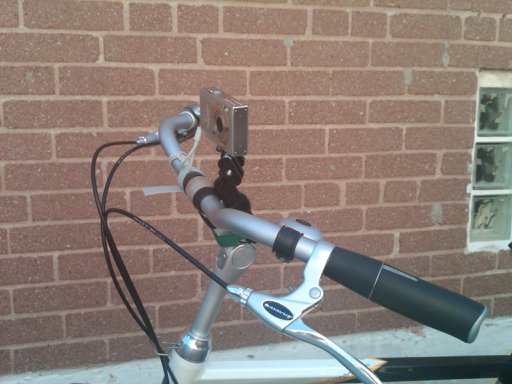
I attached an Ultrapod to the stem of my bike, and added another velcro wrap for security. The GPSMAP 60CSx fitted quite nicely under the bungees on the rear rack. The Ultrapod didn’t quite have enough stability to stay in place without drooping sometimes. I bought (but haven’t tried) the KODAK Adventure Mount, which might be more stable.
The Camera
… is a fairly basic Canon PowerShot SD790IS. What’s important is that it can run CHDK. I’d set it to take a 6MP picture approximately every 20s using the Ultra Intervalometer script.
Synching the camera to the GPS for geotagging
At the end of the trip, I took a picture of my GPS clock screen:

and then compared the time to the camera’s timestamp using jhead:
$ jhead IMG_0316.JPG
 ...
Date/Time    : 2010:07:01 16:59:50
So if the GPS time is 16:58:55, we need to subtract 55s from the camera time to make them match:
$ jhead -ta-0:00:55 IMG*JPG
And let’s check the result:
$ jhead IMG_0316.JPG
 ...
Date/Time    : 2010:07:01 16:58:55
Perfect.
Geotagging the pictures
I used ExifTool. You could also use Prune if you prefer something more graphical. Exiftool does this with minimal fuss:
$ exiftool -geotag canadaday2010-0.gpx IMG_0*JPG
(I realize I could have used exiftool instead of jhead for the timestamp check, but I’ve been using jhead for about a decade, so I know it well and like its compact output.)
You probably want to make use of a WordPress plugin like Add From Server to speed the upload process.
Adding the OpenStreetMap map
The www.Fotomobil.at » wordpress openstreetmap plugin is very flexible, but rather complex to work with. Here I’m calling the map with both markers (and lots of them) and a GPX trace:
[ osm_map lat="43.729" long="-79.275" zoom="14" width="640" height="480" marker_file="https://glaikit.org/wp-content/uploads/2010/07/canadaday2010marker.txt" gpx_file="https://glaikit.org/wp-content/uploads/2010/07/canadaday2010.gpx" ]
(Note that in the example, in order to stop WordPress from interpreting the shortcode, I’ve had to introduce a space after the [ and before the ]; in real life, they’re not there.)
The gpx file is just plain vanilla (canadaday2010.gpx) but the marker file (canadaday2010marker.txt) is a bit special. I must admit to have slightly misused the format, as I discovered that the fourth column, the description, is free-form HTML. As the default is to popup a small image thumbnail, I wedged in code to link to the full-sized image when the thumbnail was clicked. This required me to work out what attachment ID WordPress thought each picture would be. If you’re careful to upload sequentially to a single-user blog installation, you should be okay hitting the right links.
Each line of the marker file was made with a (loooong) shell one liner, an unholy mess of backticks and awk. I’m glad I can’t find it. It really wasn’t pretty at all.