Month: March 2010

  • current tools of my trade

    Mark asked: What kind of GIS software are you using?
    Well, since you asked:-

    • SpatiaLite: spatial awesome built on SQLite. I love it because I don’t need to play DBA.
    • QGIS: for maps
    • ogr: for file format futzing
    • proj: for scrupulously correct (well, if I knew what I was doing …) conversion between projected and otherwise.
    • OpenOffice: for those tedious calculations
    • … and about 20 years of unix experience to mash all the results together.

    All of the above are free. I’m doing this because I want to learn. Asking elsewhere hasn’t turned up anything useful.

  • Toronto’s Human Centre, part 2: by neighbourhood

    Beware throwaway comments; that way overanalysis lies. This was a challenge.

    Taking the 2006 neighbourhoods population into account, the human centre of Toronto is at 43.717955°N, 79.389828°W …

    … pretty close to the one I’ve already worked out by ward.

    Scraping the neighbourhood populations was hard. For the 140 neighbourhoods, the data is stored in a pdf with the URL like http://www.toronto.ca/demographics/cns_profiles/2006/pdf1/cpa124.pdf (in this case, 124; Kennedy Park, represent!). The population number is stored in a table on page 2 of each pdf. I used pdf2xml to convert the files into something parseable.

    Of course, the tables weren’t exactly in the same place in every file, so I took a sample of 10% of the files, and worked out the X & Y coordinates of the population box. pdf2xml spits out elements like

    <TOKEN sid="p2_s427" id="p2_w417" font-name="arialmt" serif="yes" fixed-width="yes" bold="no" italic="no" font-size="7.47183" font-color="#000000" rotation="0" angle="0" x="299.739" y="122.117" base="129.634" width="22.7692" height="9.94501">17,050</TOKEN>
    

    Yes, I should have used an XML parser, but a Small Matter of Perl got me 126 out of the 140 matching. The rest I keyed in by hand …

    Table after the jump.

    (more…)

  • finding the nearest thing to another thing

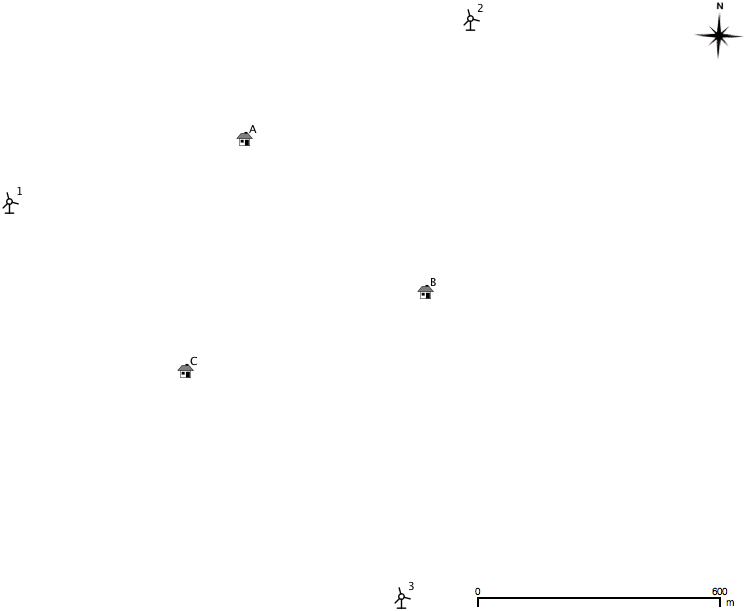
    Something I used to have to do a lot was to maintain a table of the nearest houses to prospective wind farm layouts. While the list of houses didn’t change very much, the layouts did. I came up with an only semi-unwieldy spreadsheet to do the calculations. The table was ultimately used in submissions to the Ontario Ministry of the Environment.

    I’ve mapped out a trivially small example below; three houses, three wind turbines. In real life, there would be hundreds of each.

    Sorry to include it as an image, but WordPress really doesn’t like pasted tables. If you really must, the text content is below the fold.

    Though it’s small, it’s a bit of a horror, so you might want to download near.ods (opendocument spreadsheet). The mauve section contains the house coordinates, the blue the turbines. The green section is a simple Cartesian distance calculator (√(Δx2+Δy2)) for those coordinates. The beige (or orange; or is it salmon?) bit is where things get difficult. Finding the closest distance is easy with the MIN function. Finding the column heading in which that minimum distance occurs is a bit more tricky, using INDIRECT, ADDRESS, COLUMN and MATCH to pull out the contents of the cell. This is one of the few spreadsheets I’ve written that will break if you rearrange it; hardcoded cell address mathematics will do that.

    Getting the same result in SQL is little more difficult. I mean, I can make the table of distances easily enough:

    
    select houses.ref as House,
     turbines.id as Turbine,
     distance(houses.geom, turbines.geom) as Distance
    from houses, turbines
    order by House, Turbine


    but producing a nice compact table of houses, the nearest turbine, and the distance will need more pondering.

    (more…)

  • toronto’s human centre

    Since it was trivial to calculate the centre of the city, I thought I’d do something a little more complex: calculate the centre of the city, weighted for population. I scraped the 2006 population data by ward from the City of Toronto: Ward Profiles pages; hooray for curl and regexes. Realising that I had no information on population distribution within wards, I made a good old engineering assumption: we could idealize the population as a point mass at the centroid of each ward, and then calculate the centre of mass by balancing moments around the X and Y axis. (I mean, c’mon – it’s the sort of thing we all think about daily … isn’t it? Guys … hello … anyone there?)

    I’ll spare you the details until after the jump, but I calculate the human centre of Toronto to be at 43.717794°N, 79.390299°W – that’s in Blythwood Ravine, just south of Blythwood Road. We should have a picnic there …

    (more…)

  • Japanese Map Symbol for a windmill

    I’m rather taken with the symbol that Japanese maps use for wind mills and wind turbines. I’ll try to modify it for use in QGis.

    Update: so how does this look?

    I cleaned up the blade angles, added line end-caps, and made all the white bits transparent. Works fine in QGis.

  • a minor revelation about road segments

    I’m still learning how Toronto encodes its roads – and whether this is a common practice. Between intersections, roads are stored as polyline segments. Kennedy Road (blue) and Eglinton Ave E (red) are shown below as a series of road segment minimum bounding rectangles (MBR):


    I was hoping it would be quick and easy to find the MBR of the whole street, then search for intersections only in the intersections of the MBRs. On an orthogonal grid (even a squinty one) this would save a bunch of searching.

    I don’t know if I can use the fact that the end points of road sections are common at intersections. I really am a geonumpty.

    All this may soon be moot, as I hear that the next release of the toronto.ca | Open data – expected early April – will have explicit intersection data. Yay!

  • Toronto’s Angles

    As many Canadians will tell you, most Torontonians are a bit skewed. While others might have different explanations, I put it down to our road grid. What we call north in the city is actually some 16.7° west of north.

    While we do have a perpendicular grid, it’s twisted to the left (steady, Edmontonians). I attempted to work out what the average angle is.

    I eyeballed several long straight streets, and picked out representative intersections. Finidng the coordinates of these intersections took a surprisingly long time, as each street has several road sections. To find an intersection, each section on one road has to be queried against each section of the other. It gets there, eventually.

    To save the tedium of showing the queries, here are the results. The angles are anticlockwise from the X-axis.

    N-S	 Intersection1 Intersection2 Angle
    ======== ============= ============= ======
    Bathurst King	       Dupont	     16.184
    Yonge	 King	       Rosehill	     16.783
    Woodbine Queen	       Plains	     17.049
    
    E-W	 Intersection1 Intersection2 Angle
    ======== ============= ============= ======
    Danforth Greenwood     Main	     16.736
    Eglinton Dufferin      Bayview	     16.159
    Steeles	 Dufferin      Kennedy	     17.194
    

    I was surprised that SpatiaLite didn’t have any angle measurement functions built in, so I had to feed the output through geod. So for instance, for Steeles Avenue, the intersection of Steeles West and Dufferin is at 43.787229°N, 79.470285°W, and the intersection of Steeles East and Kennedy is 43.823636°N, 79.307265°W. Feeding these numbers to geod:

    echo '43.787229 -79.470285 43.823636 -79.307265'| geod +ellps=WGS84 -f &quot;%.3f&quot; -p -I +units=m

    This spits out three numbers: 72.806    252.918    13727.395. The first is the bearing from the first point to the second; this is the number we’re interested in, and it’s (90-82.806) = 17.194° clockwise from E. The second is the bearing from the second point back to the first. The last is the distance in metres; Steeles is a long, straight street.

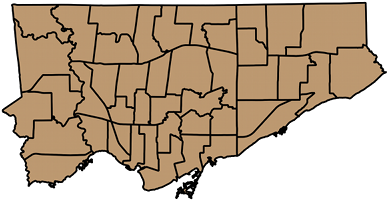
    Averaging the numbers for the streets I chose gets 16.684°; just the thing for Torontohenge. For a visual axis, maybe using Steeles’s 17.194° could be better, as it’s a line above the city. You can set the map rotation angle in QGIS’s map composer, and get a better aligned city:
  • but where am i, really?

    In my first post I asked where am i? The gps in my phone said I was standing at 43.73066°N, 79.26482°W. In real life, I was standing at the junction of Kenmark Blvd and Chevron Cres.

    With the Open Toronto centreline data, I can check the location of road intersections:

    select distinct (
    astext (
    transform (
    intersection ( r1.geometry, r2.geometry ), 4326
     ) ) )
    from centreline as r1, centreline as r2
    where r1.lf_name = 'KENMARK BLVD' and r2.lf_name
     = 'CHEVRON CRES'
    

    which returns:

    NULL
    POINT(-79.262423 43.730019)
    POINT(-79.264815 43.730591)
    

    Hmm; three answers. NULL I can’t answer; I’ll put it down as an exhortation to Be Here Now. The second is given a clue by one of the street names: Chevron Crescent – first thing I learned when I had my newspaper round is that a crescent’s going to end you up back on the same road you started from. The last one, though, agrees to 5(ish) decimal places – well within the accuracy of my simple GPS.

    Update: This query gets really, really slow on long streets. Both Chevron and Kenmark only have two road segments. Kennedy and Steeles East each have over 90.

  • Finding the exact geographic centre of Toronto

    Spacing has alluded to it. The Ontario Science Centre makes bold (and incorrect) claims about it. But here’s the real deal.

    • If you consider Toronto to be defined by its city wards, the centre of Toronto lies at 43.725518°N, 79.390531°W.
    • If you consider Toronto to be defined by its neighbourhoods, the centre of Toronto lies at 43.726495°N, 79.390641°W.

    You can work this out in one line of SQL. By combining all the wards or neighbourhoods into one union shape (SpatiaLite uses the GUnion() function), and then calculating the centroid, that’s the centre of the city:

    select astext(transform(centroid(gunion(geometry)),4326)) from wards

    To get the results in a more human-friendly format, I transformed it to WGS84 (EPSG SRID 4326), and used astext() to get it in something other than binary.

    Update, 18 March: great minds, etc … Torontoist just posted the similar In Search of Toronto’s Geographic Centre.

  • oooOOOooh!

    Now that’s a bit better. And I did it with only mild shapefile abuse.

    You can load the DBF component of a shapefile into Openoffice Calc. Columns get given headers which describe their format. By pasting in the candidates column, adding the right column definition, and then resaving, you get a shapefile with today’s candidates as a new field.